What DriveGuard.exe does?
• Adds itself to startup and the task manager.
• Adds a registry key for making changes in the registry editor.
• Adds Autorun.inf file in the pen drive
• Adds some malicious temporary files in the system.
Solution:
1. Boot the computer in the Safe Mode.
2. Open the task manager and kill the processes with names DriveGuard.exe/FlashGuard.exe/DriveMonitor.exe
3. Open My Computer and search for the same virus names but don’t forget to check all the boxes in the ‘More Advanced Options’ of search. Delete all the files.
4. Now search for .tmp.exe and delete DriveGuard.tmp.exe and gHmpg.tmp.exe files, if any.
5. Open the msconfig, now go to startup processes and uncheck the FlashGuard process to remove it from the startup list.
6. Open Regedit and navigate to HKEY_LOCAL_MACHINE\Software\Microsoft\Windows\CurrentVersion\Run\FlashGuard.

7. Click on FlashGuard and delete the key.
The virus would have been removed.


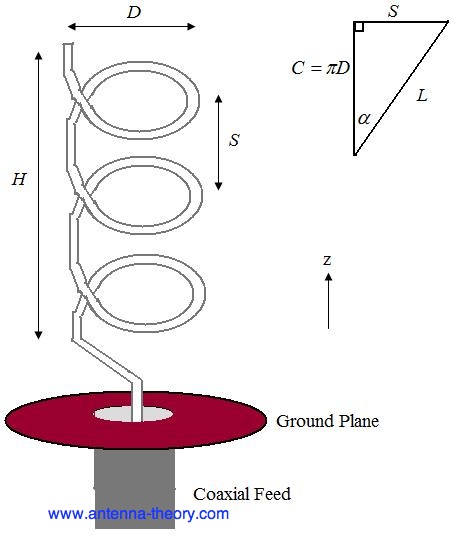
 - pitch angle, which controls how far the antenna grows in the z-direction per turn, and is given by
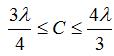
 =0.75C=0.375 meters, which corresponds to a frequency of 800 MHz. The lowest frequency of operation will be given by the largest wavelength that fits into the above equation, or
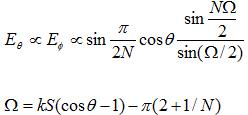

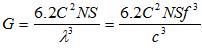
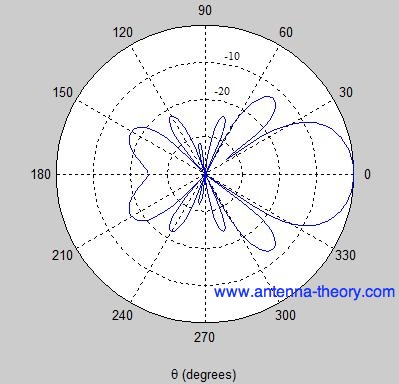
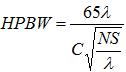
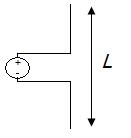

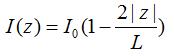
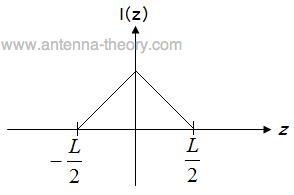
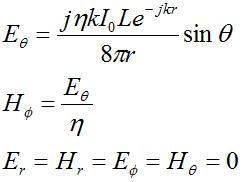
 and
and  fields are nonzero. Further, these fields are orthogonal and in-phase. Further, the fields are perpendicular to the direction of propagation, which is always in the
  direction (away from the antenna). Also, the ratio of the E-field to the H-field is given by
  (the
(the 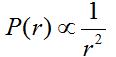
 , which should make sense (more current, more power).
 . For a vertical antenna oriented along the z-axis, the radiation will be maximum in the x-y plane. Theoretically, there is no radiation along the z-axis far from the antenna.